 Muser Studio
 📦 Muser Studio v1.0.31:
Dynamic Panels Video Looping App


Release Notes
Features:
- New Render Theme option for your video edits: Dynamic Panels. Select it via the “Send” tab.
Bug fixes:
- Fix for intermittent unrecoverable state when device cycles through standby/resume during rendering.
- Camera and video playback could get stuck when switching to another app/home and back again.
- Stability improvements to MIDI Remote controller flow.
- Improved exports and re-rendering queue management including resilience for standby/resume and app backgrounding.
🪟 Dynamic Panels!
Instead of looping videos windows flying in and out from above, we can now switch to the new Dynamic Panels Theme in the Send tab - like this:
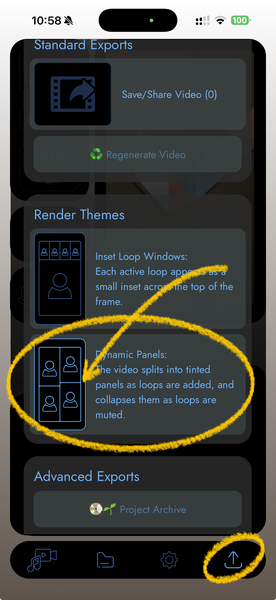
Your video edits will now render with video loops and main recording shuffling around each other. It works on any previous recordings too. Load them up, and select the same Dynamic Panels theme in the Send tab, then Regenerate the video.
As a vfx veteran I can tell you that editing something like this by hand would be a bit of a nightmare. A nightmare you don’t have to live through, because it’s all done for you!
In a future update I’ll be creating controls for colour tint, video clip positioning/scale. I decided to spare you the wait so you get playing with it now. Plus I’m pretty excited about it so I wanted to share!
🛠️ Big bag of fixes
On top of the fancy new Dynamic Panels I took a long hard look at some issues that could trip up Muser Studio. Things like powering down/locking the phone, backgrounding the app mid-render.

At these times iOS quite reasonably removes resources from the Muser Studio, leaving it feeling like Vincent Vega in Pulp Fiction. Things should be a lot more stable now!
MIDI remote users will have an easier time of pairing their devices as well. Cleaned up some logic under the hood to make that more reliable.
And finally the Advanced Exports, and Regenerate render functions work more gracefully in that cancelling them is easier, and starting a New Project will abort the export more cleanly.
Some closing thoughts
If you’ve got thoughts on what would make using Muser Studio easier and more fun, I would love to know about it. Feel free to reach out!
v1.0.31 is available now for iOS
Photo credit: George Pixel - Grid Of Colorful Lights On A Dark Wall.
GIF credit: Giphy
No comments yet - be the first!