 Muser Studio
 📦 Muser Studio v1.0.9:
Interactive Timeline Indicator


Release Notes
Features:
- Scrubbing through the rendered video now reveals an interactive timeline indicator for visual feedback.
- Regenerate Video button on the Share Page now indicates render progress.
- Added a Release Notes button on the Settings Page to keep you updated on what’s new and what’s changed.
- Improved Mandarin translation for core UI and Tour callouts.
Bug Fixes:
- Project Browser now correctly updates when loading sessions.
- New Project during recording, or within an empty project no longer spawns an extra project. Now just cleans up the one you’re already in.
- Smoother Render Progress updates resolving intermittent glitching with multiple re-renders.
🕓Timeline and Render Progress Indicators
This one’s simple, but oddly comforting:
When you scrub through your rendered video, Muser Studio shows an Interactive Timeline Indicator that moves with you — so you can see exactly where you are in the final video, rather than guessing.(If you landed here looking for a timeline indicator app release notes example — hey, welcome. This is one. And yes, it’s live in the App Store.)
These little touches just make the experience feel clearer and more responsive.
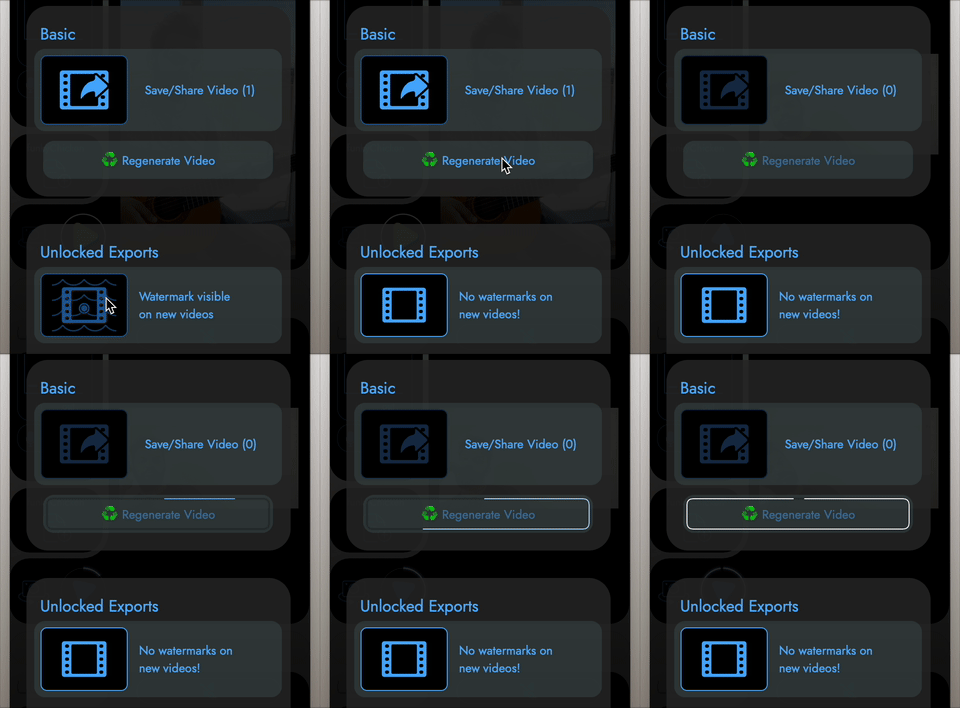
Turn off Watermark and Regenerate Video
Similarly, the Regenerate Video button now shows live render progress, right there on the Share Page.
It’s very useful when you create something in unpaid mode, then decide to support the project by becoming a subscriber (💚 huge thank you!) and re-export your video watermark-free.
🌐Translation Improvements
A good friend kindly reviewed the Mandarin (Chinese Simplified) translation of the app and helped me level up the language. The Intro Tour Guide should now be easier to understand! The improvements have also made it out to some of the UI elements as well.
As always as, doing additional languages is a work in progress. Massive thanks to all of the Muser Studio Users for patience and sharing their international linguistic knowledge. As always if you are willing to help make Muser Studio better for your fellow country-people please reach out via the support portal or the ”🐞 Bug Report” button in the app.
🐛What We Fixed
Loading saved sessions now correctly refreshes the Project Browser. Previously, some users wouldn’t see the new project highlighted until restart – not ideal. That’s sorted.
Creating a New Project mid-recording or from an empty session now simply resets the current one – no more accidental extras.
This update is already live in the App Store!
No comments yet - be the first!