 Muser Studio
 Making Quicktime Movies with multiple audio language tracks

I was comparing outputs from Muser Studio, and needed to make Quicktime movie files with two audio tracks in it. Specifically, I wanted QuickTime Player to let me switch between them. Every guide on the internet says to tag the tracks with a language code and you’re done. So, for convenience I named them English and French.
~tldr They were right.
What follows is the day I spent proving it, via a byte-level patcher, a detour through Apple’s own media framework, and a brief period of questioning my life-choices. I’m writing it down because I suspect I’m not the only one who’s done this, and sometimes it’s nice to read about someone else doing it.
The answer, before wasting your time too
Mux the file with ffmpeg, tagging each audio track with an ISO 639-2 language code:
ffmpeg -i video.mp4 -i english.wav -i french.wav -map 0:v -map 1:a -map 2:a -c:v copy -c:a aac -b:a 192k -metadata:s:a:0 language=eng -metadata:s:a:1 language=fra out.mp4
That’s it. No patching, no muxer flags, no third-party tool. Open it in QuickTime and the languages are sitting there in the View menu.
ffmpeg quietly handles the fiddly container bits for you - it puts both audio tracks in the same alternate group and enables only the first one, which is exactly what QuickTime wants. You don’t have to ask.
So why the whole rabbit hole?
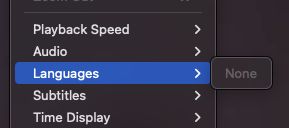
That one observation was wrong. Not the file, the observation. QuickTime’s Languages menu is, it turns out, occasionally just empty for a files that are completely fine. Force-quit QuickTime, open the same files again, and most likely you’ll see your languages.
I did not know that. So I did what I imagine a good number of us would do: I assumed I was the problem, then went looking for what I did wrong.
The Museum of Wasted Effort
In rough order, here is everything I did that turned out to be completely unnecessary.
I wrote a tool to walk the container atoms. It reported both audio tracks in alternate group 1, one enabled, one not, languages eng and fra. Textbook. I decided the tool must be missing something.
I asked AVFoundation. This is the framework QuickTime Player is built on, so it seemed like the horse’s mouth. It informed me there were two selectable audio options, named “English” and “French”, correctly tagged, with English as the default.
Which was the answer I wanted. From the horses mouth. And QuickTime still showed me an empty menu.
I tried getting AVFoundation to author the file itself, on the theory that Apple’s own writer must know something ffmpeg doesn’t. It doesn’t. AVMutableMovie.writeHeader silently threw away the alternate group I’d set and produced a file that was genuinely worse than ffmpeg’s. This remains true and is the one useful thing I learned that day.
Then I found “it”. I diff’d the raw track headers between a file that worked and one that didn’t, and there it was - three bytes. ffmpeg writes 0x03 on the first audio track and 0x02 on the second. Apple’s own files use 0x0f and 0x0e. Obviously that was the problem.
So I wrote this:
import struct,sys

b=bytearray(open(sys.argv[1],'rb').read())
def bx(s,e):
    p=s
    while p+8<=e:
        n,t=struct.unpack('>I4s',b[p:p+8]);h=8
        if n==1:n=struct.unpack('>Q',b[p+8:p+16])[0];h=16
        elif n==0:n=e-p
        if n<h:break
        yield t,p+h,p+n;p+=n

for t,s,e in bx(0,len(b)):
    if t!=b'moov':continue
    for t2,s2,e2 in bx(s,e):
        if t2!=b'trak':continue
        k=None;a=False
        for t3,s3,e3 in bx(s2,e2):
            if t3==b'tkhd':k=s3
            elif t3==b'mdia':
                for t4,s4,_ in bx(s3,e3):
                    if t4==b'hdlr' and b[s4+8:s4+12]==b'soun':a=True
        if k and a:b[k+1:k+4]=b'\x00\x00'+bytes([0x0f if b[k+3]&1 else 0x0e])

open(sys.argv[1],'wb').write(b)
Please do not bother to run that. It works perfectly but it achieves nothing.
I patched a file, opened it, and there were my two languages. Triumph. I patched three more variants to work out precisely which bit mattered, and every single one of them worked. Four for four. Case closed, and off I went to write it all up.
The facepalm
I tested four patched files. All four worked. What I didn’t do was go back and open an unpatched file again.
Four patched files agreeing with each other only proves that patched files work. The thing I actually needed to know was whether unpatched files failed, and I had just one observation of that, from the very beginning, which is the one that was wrong.
When I finally did re-run it, the unpatched file worked fine. So did a version with no language tags at all - two entries, both cheerfully labelled “Unknown Language”. The patch had never done anything. I had spent a day building an elaborate explanation on top of a single flaky reading.
Note to self.
Don’t rush the control test.
The boring one you skip because you already know what it’ll say.
What tipped me off, ironically was the next morning, opening the working patched movies to find this monster again.
Harsh language
Things that are real, having now been rather more carefully checked.
Don’t mark both tracks as default. If you set -disposition to default on both audio streams, ffmpeg puts them in separate alternate groups and enables both. This is behind most of the “QuickTime plays all my audio at once” posts you’ll find.
If you want French to be the one that plays first, use -disposition:a:0 0 -disposition:a:1 default - one default, not two.
You mustn’t name the tracks with ffmpeg.
-metadata:s:a:0 title="Director's Commentary" gets silently dropped by the muxer, with or without -movflags use_metadata_tags. I tried both. QuickTime names the menu entries from the language code regardless, so you get “English”, “French” etc. but no flexibility beyond that. More research needed for custom names. Maybe it’s a job for Subler or MP4Box.
Ignore anything mentioning QuickTime Pro 7.
Search this problem and you’ll get a pile of results telling you to open Movie Properties and set “Alternate” to “None”. That is the exact opposite of what you want here, and it’s advice from a version of QuickTime that hasn’t shipped in years.
.mov files store the language differently. Write to .mov and ffmpeg puts old Mac language codes in there - 0 for English, 1 for French - rather than the three-letter codes you’d see in an .mp4. This is correct and everything handles it properly. It’ll just confuse you if you go poking at the bytes yourself, as I did, and briefly think your file is broken.
Checking your own files
If QuickTime shows you an empty Languages menu, quit it completely and open the file again before you suspect the file. I cannot stress this enough, for reasons that should by now be pretty clear.
If you do want to look inside, this is a perfectly healthy file:
track_id=1 video_enabled=YES flags=0x0003 alternate_group=0  lang=und
track_id=2 sound_enabled=YES flags=0x0003 alternate_group=1  lang=eng
track_id=3 sound_enabled=no flags=0x0002 alternate_group=1  lang=fra
Two sound tracks, same alternate group, different languages, only one of them enabled. The 0x0003 and 0x0002 are absolutely fine. Ask me how I know.
Worth noting VLC never once complained about any of this. It cheerfully offered track selection on every file I threw at it, including the ones I was convinced were broken. It just didn’t sit right with me, being forced to use a different player.
All of the above was on macOS 15 with ffmpeg 8.0.1.
So, if you’ve ever built a beautiful, well-tested, thoroughly documented solution to a problem that wasn’t happening - you’re in good company. Mine had a Python script and a table.
Hope this saves you an afternoon and gives you a cause for a laugh, or sympathy. Either work. In the meantime I’m going to have a little lay down.
Photo credit: zhendong wang - A Group Of Colorful Speech Bubbles On A Wooden Wall
No comments yet - be the first!